Gumroad + ConvertKit integration: how to sync customers to email automatically
Every time someone buys on Gumroad, they give you something more valuable than the sale: permission to talk to them again.
Most creators waste it.
The buyer gets the download link and a generic Gumroad receipt. No welcome sequence. No product-specific onboarding. No upsell path. Two weeks later they have forgotten your name, and the next product launch goes to an email list that does not include them — because they were never properly added.
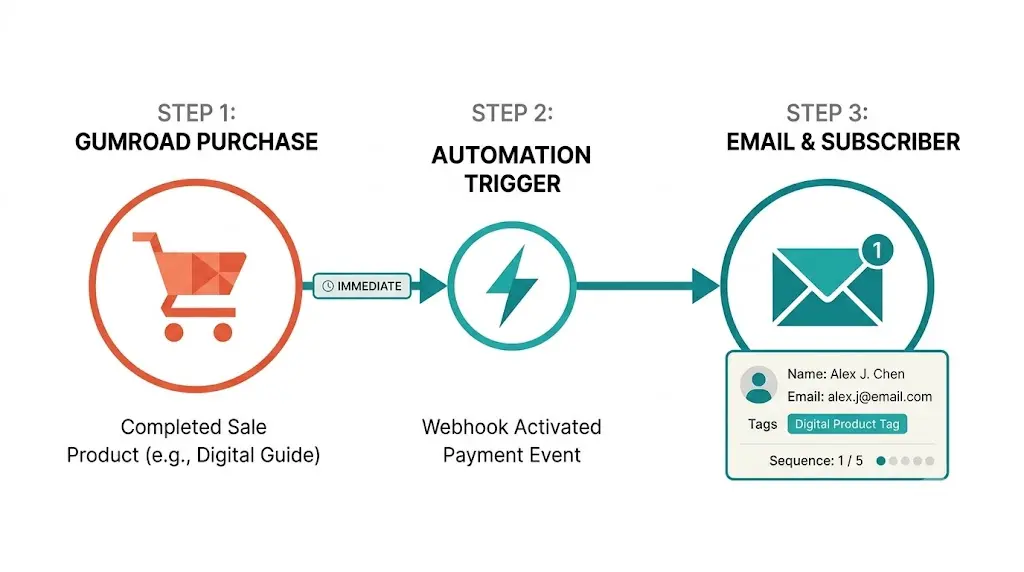
A Gumroad + ConvertKit integration fixes this. Every purchase triggers a targeted ConvertKit sequence automatically. The buyer is tagged with the specific product they purchased, added to the right segment, and sent a welcome sequence relevant to what they just bought — not a generic newsletter.
This post covers exactly how to set it up, why Zapier fails at scale, and what a properly enriched integration looks like.
Why every Gumroad sale needs a ConvertKit trigger
Gumroad handles the transaction. ConvertKit handles the relationship.
These are different jobs and they need to be connected deliberately.
Gumroad is excellent at checkout, delivery, and affiliate management. ConvertKit is excellent at segmented email sequences, automation rules, and long-term subscriber management. The problem is that most creators treat the Gumroad receipt email as the end of the purchase experience. It is not. It is the beginning of the customer relationship — and that relationship lives in ConvertKit, not Gumroad.
What a proper Gumroad to ConvertKit workflow unlocks:
Post-purchase onboarding. A five-email sequence that walks buyers through using the product they purchased. Reduces refund rates. Increases satisfaction. Creates word-of-mouth. None of this happens if the buyer stays in Gumroad's system only.
Product-specific segmentation. A buyer who purchased your SEO template has different interests than a buyer who purchased your LinkedIn playbook. ConvertKit tags let you send relevant follow-up content to each segment. One generic newsletter that tries to address everyone is the least effective version of email marketing for digital product creators.
Upsell sequences. If a buyer purchases product A, a ConvertKit automation can trigger a sequence three days later offering product B at a discount. This requires knowing which Gumroad product triggered the ConvertKit subscription. Without product-specific tagging, this is impossible to personalise.
Lifetime value compounding. Customers who receive relevant post-purchase email sequences buy again at significantly higher rates than customers who receive nothing. ConvertKit is where that relationship is built. Gumroad is just where the first transaction happens.
What is the Gumroad + ConvertKit integration?
The Gumroad + ConvertKit integration is a trigger-action workflow where a completed Gumroad purchase automatically does five things:
- Adds the buyer to ConvertKit as a subscriber or updates their existing record
- Tags them with the specific Gumroad product they purchased
- Adds them to the correct ConvertKit segment
- Triggers the post-purchase automation sequence for that product
- Suppresses them from generic newsletter sequences until onboarding completes
The key word is automatic. Manual CSV exports from Gumroad and manual imports to ConvertKit are failure-prone and lag the buyer experience by hours or days. A buyer who receives a welcome email six hours after purchase is already past their peak emotional engagement with the product. The integration needs to be real-time: purchase completes, ConvertKit subscriber created, sequence triggered.
Step-by-step: setting up Gumroad + ConvertKit integration
Option 1: The Zapier workflow
The standard approach uses Zapier to connect Gumroad's purchase webhook to ConvertKit's subscriber API.
Step 1. Create a Zapier account and connect Gumroad as a trigger source.
Step 2. Set the Gumroad trigger to "New Sale" — this fires whenever a purchase completes.
Step 3. Add a ConvertKit action — "Add Subscriber" with the buyer's email, first name, and a static tag matching the Gumroad product.
Step 4. Test with a Gumroad test purchase and confirm the subscriber appears in ConvertKit with the correct tag.
Step 5. Set up ConvertKit automations that trigger when a subscriber is tagged with each product tag.
This works for a simple setup with one or two Gumroad products. The limitations appear when you scale.
Static tags only: Zapier sends a single fixed tag per Zap, not dynamic product-specific tags. Multiple products require multiple Zaps.
No enrichment: The buyer's full Gumroad context — product variant, bundle, referral source, coupon used — does not pass to ConvertKit.
No deduplication logic: If a buyer purchases twice, Zapier may create duplicate subscribers or overwrite existing tags.
Zapier costs: At 1,000+ Gumroad sales per month, you hit task limits and pay for overages.
Option 2: Thoth's enriched integration workflow
Thoth's Gumroad + ConvertKit integration goes beyond the basic Zapier webhook.
Purchase trigger. Every Gumroad purchase fires a webhook that Thoth receives in real time.
Enrichment. Thoth extracts the full purchase context — product name, variant, bundle membership, coupon used, referral source, and whether the buyer is a new or returning Gumroad customer.
Dynamic tagging. ConvertKit tags are set dynamically based on purchase context, not statically per Zap. A buyer who purchased a bundle gets tagged as a bundle buyer. A buyer who used a specific affiliate coupon gets tagged with that affiliate source. Returning buyers get a returning-customer tag that suppresses the first-time welcome sequence.
Sequence routing. The correct ConvertKit sequence for each product fires automatically — no manual automation rule setup for each new product.
Deduplication. Thoth checks for existing ConvertKit subscribers before creating new ones, updating the subscriber record with new tags rather than creating duplicates.
Campaign memory. Purchase patterns, sequence open rates, and conversion data feed back into Thoth's content planning — so the content you publish next reflects what your Gumroad buyers actually care about. This is the same loop that makes AI citation tracking compound your content impact over time.
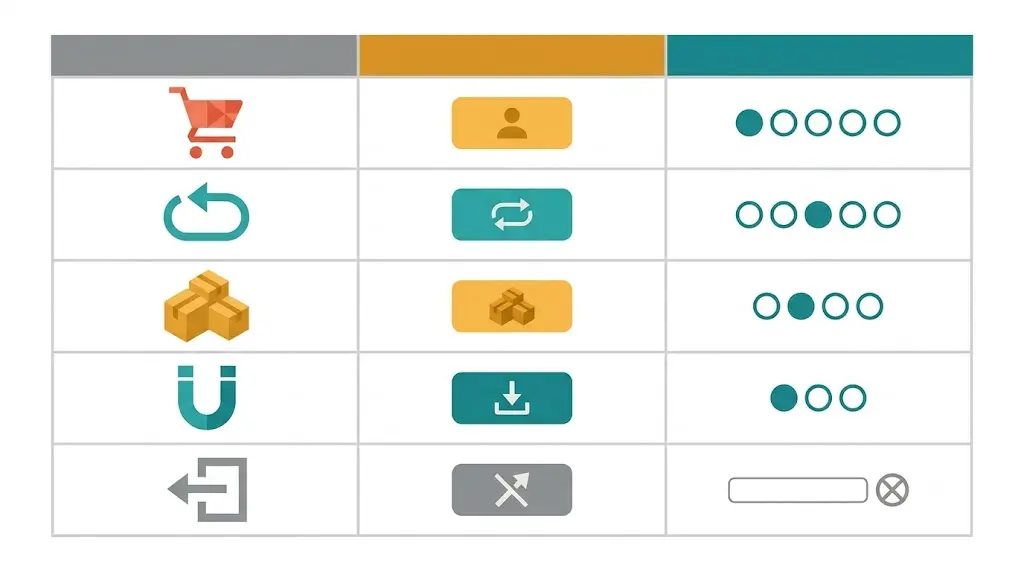
The Gumroad + ConvertKit workflow table
Here is the recommended setup for a creator with five or more Gumroad products:
| Purchase event | ConvertKit action | Sequence triggered |
|---|---|---|
| First-time buyer, product A | Add subscriber, tag "product-a-buyer" + "new-buyer" | Product A welcome + onboarding (5 emails) |
| Returning buyer, product B | Update subscriber, add tag "product-b-buyer" + "returning-buyer" | Product B quick-start (3 emails — skips basics) |
| Bundle purchase | Add subscriber, tag "bundle-buyer" + all included products | Bundle welcome + cross-product orientation |
| Free lead magnet download | Add subscriber, tag "lead-magnet-[name]" | Nurture sequence — product pitch at email 7 |
| Refund processed | Update subscriber, add tag "refunded", suppress from promos | Winback sequence after 30 days |
Common mistakes with Gumroad + ConvertKit integrations
Not tagging by product. Adding all Gumroad buyers to a single ConvertKit list without product-specific tags makes it impossible to send relevant follow-up content at scale. Every new Gumroad product needs its own ConvertKit tag and automation rule.
Using Gumroad's native email for onboarding. Gumroad's post-purchase email is a receipt, not a relationship. ConvertKit's sequence editor is significantly more flexible — use it.
Not suppressing generic sequences during onboarding. If a new buyer enters your weekly newsletter on day one of the post-purchase sequence, they receive two to three emails in the first week and unsubscribe faster. Suppress new buyers from broadcast emails until their onboarding sequence completes.
No returning buyer logic. A buyer who purchases a second Gumroad product should not receive the same first-time welcome sequence. A "returning-buyer" tag suppresses the generic onboarding and triggers a shorter, faster sequence.
Not connecting purchase data to content strategy. Your most popular Gumroad products reveal what your audience is willing to pay for. This data should feed your next blog post and ConvertKit broadcast calendar. For teams using automated outreach alongside email, the ConvertKit + Slack integration surfaces these buyer signals to your team in real time. For LinkedIn distribution of the resulting content, Mailchimp + LinkedIn integration for SaaS outreach covers that workflow.
FAQ
Ready to connect Gumroad and ConvertKit with richer data than Zapier delivers? [Get a free AI visibility audit at distribution.studio](https://distribution.studio) and see how Thoth connects your product, email, and content workflows into one self-learning growth loop.
Back to all blogs