AI page inspector tools: see exactly what LLMs read on your site
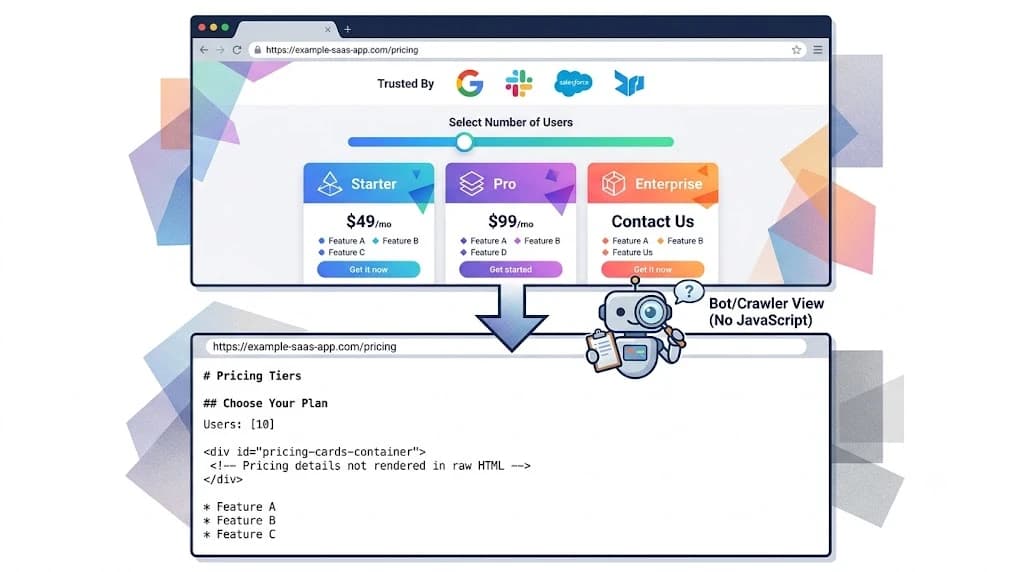
Your website looks incredible. The interactive pricing slider converts flawlessly. The React hydration is seamless. The dynamic features tabs are polished.
There is just one problem: ChatGPT, Claude, and Perplexity cannot see any of it.
As search traffic shifts from traditional Google blue links to generative AI answer engines, a new technical barrier has emerged. AI bots do not render your site like human browsers do. They strip away CSS, ignore complex JavaScript, and bypass interactive elements to scrape raw, static HTML. If your core value proposition is hidden behind a script, you are invisible to AI.
That is the visibility gap. And it is the gap that kills most SaaS brands in AI search before they ever gain a single citation.
An AI page inspector tool shows you exactly what the bots see — and where your content is disappearing. Here is how they work, why LLMs are skipping your site, and the technical fixes required to rebuild your DOM for generative engines.
What is an AI page inspector tool?
An AI page inspector tool is a technical SEO utility that simulates how large language models — ChatGPT, Gemini, Perplexity, Claude — crawl and extract data from a webpage. Unlike traditional search crawlers that focus on link structures and meta tags, an AI page inspector strips away complex scripts and CSS to reveal the raw markdown and entities the AI actually comprehends.
The output shows you: which content blocks survive the raw HTML fetch, which sections are returning null or empty, which entities the model identifies as the page's core subject, and whether your structured data is being read or ignored.
Traditional crawlers like Screaming Frog read the rendered DOM — the page after JavaScript has executed. An AI page inspector fetches the raw static payload. That difference is exactly where most SaaS sites fall apart.
Why LLMs ignore your best content
To understand the value of an AI page inspector, you have to understand how bots like GPTBot, PerplexityBot, and Google-Extended actually work.
When an LLM crawls your site to answer a user's prompt, it operates with extreme efficiency. Rendering JavaScript at scale is computationally expensive. Generative engines do not have the luxury of waiting three seconds for your headless CMS to hydrate the DOM.
They hit the URL. They download the raw static HTML. They extract the text. They leave.
If your pricing tiers only load when a user moves a slider, the LLM captures a blank space. It then searches for a third-party review site that has your pricing listed in plain text — and cites your competitor's blog instead of your official page.
The most common AI blind spots:
Dynamic pricing tables. Hidden behind JavaScript toggles for monthly vs annual billing. The toggle never fires in a headless crawl. The LLM sees nothing.
Client-Side Rendered (CSR) feature lists. Content that requires heavy React hydration before appearing. If the component is not server-side rendered, the initial HTML is an empty div.
Interactive carousels. Testimonials and use cases buried in sliders. The carousel never advances in a bot crawl. Only the first slide — often a generic headline — gets extracted.
Shadow DOMs. Web components that encapsulate styling and markup, completely obfuscating text from basic scrapers.
ChatGPT vs Perplexity: how each parses your pages differently
Not all AI bots read your site the same way. Optimising for "AI" as a single channel misses the nuanced differences in how these RAG systems operate.
ChatGPT Search (OAI-SearchBot) OpenAI's crawler is heavily biased toward semantic HTML5 tags. It looks for <main>, <article>, and strict H1 to H2 to H3 hierarchies. It is poor at reading layout tables — tables used for design rather than data — and will jumble text nested too deeply in generic <div> tags. It weights the first 200 words of a page heavily to determine entity relevance. If your opening paragraph is a hero tagline with no product definition, you fail the entity check immediately.
Perplexity (PerplexityBot) Perplexity is an answer engine first. It aggressively parses structural data components — lists (<ul>, <ol>) and markdown-style tables. It actively looks for FAQPage schema. If a user asks "Distribution Studio vs SpreadJam," Perplexity hunts for a <table> tag comparing the two, extracts the rows, and generates a native response citing that block specifically. No table, no citation.
An AI page inspector shows you your code through both parsers simultaneously — so you can fix it once and be readable universally.
For AI citation tracking and why it matters, that post covers the measurement layer after you have fixed the technical foundation this post addresses.
The React hydration problem: why CSR kills AI search visibility
Most modern SaaS sites are built on Next.js or similar React frameworks. While these support Server-Side Rendering (SSR), many developers default to Client-Side Rendering (CSR) for interactive components to speed up development. That default is an AI search disaster.
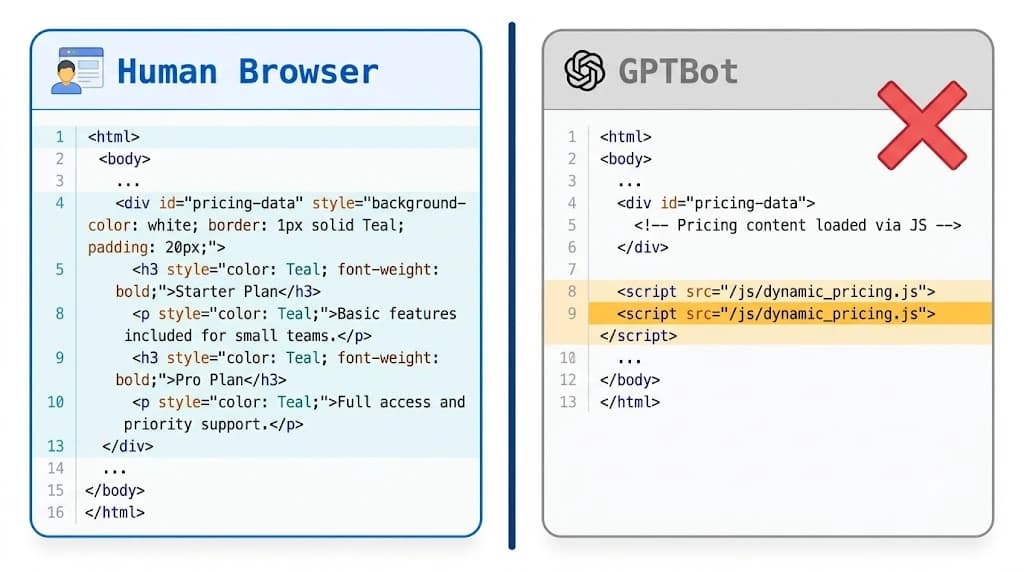
Here is what happens when a generative crawler hits a CSR component:
What a human browser renders:
<div id="pricing-tier">
  <h3>Pro Plan</h3>
  <p>$99/month. Includes autonomous SEO, Ghost integration,
     and AI citation tracking.</p>
</div>
What GPTBot sees in the raw HTML fetch:
<div id="pricing-tier"></div>
<script src="/_next/static/chunks/pricing.js"></script>
The crawler sees an empty div. It does not execute the script. Your pricing does not exist in the AI's vector database. Your competitor whose pricing is in plain HTML gets cited instead.
This is why an AI page inspector is not optional. It forces you to confront the raw payload. If your core entities are missing from the raw HTML, the fix is moving that data fetching to getServerSideProps or the App Router equivalent — ensuring the DOM is fully populated before the bot arrives.
Case study: fixing a pricing hallucination
The most expensive AI visibility failure is incorrect data being cited confidently.
A SaaS company noticed their impressions for "[Brand] pricing" were dropping but their traditional Google rankings remained stable. Buyers were shifting their queries to ChatGPT.
When queried directly, ChatGPT stated the software cost $49/month. The actual price was $299/month.
Running the pricing URL through an AI page inspector revealed the issue. The company had recently updated their pricing page to a dynamic React component. The old $49/month pricing was still sitting in a neglected FAQPage JSON-LD schema block at the bottom of the page, while the new $299/month pricing was hidden inside the CSR component.
The LLM crawler hit the page, ignored the CSR component, read the outdated JSON-LD schema, and served the hallucinated price to hundreds of buyers in consideration.
The fix had three steps:
First, the pricing table data moved to an SSR component so it appears in the initial HTML payload.
Second, the FAQPage schema was updated to reflect the new tiers with the correct monthly and annual pricing for each plan.
Third, a clean markdown-equivalent HTML table was added below the dynamic slider as a fallback for scrapers that process HTML tables better than JSON-LD.
Within 72 hours, AI citation tracking showed ChatGPT serving the correct $299/month price in responses.
Building a Python AI page inspector (20 lines)
You do not need enterprise software to run your first AI page inspection. Here is a rudimentary inspector using Python, requests, BeautifulSoup, and html2text — simulating a bot fetching your page without JS rendering:
import requests
from bs4 import BeautifulSoup
import html2text

def ai_page_inspector(url):
    # Simulate GPTBot user-agent
    headers = {
        'User-Agent': 'Mozilla/5.0 (compatible; GPTBot/1.0; '
                      '+https://openai.com/gptbot)'
    }

    # Fetch raw HTML — no JavaScript execution
    response = requests.get(url, headers=headers)

    if response.status_code != 200:
        return f"Error: Failed to fetch {url}"

    soup = BeautifulSoup(response.text, 'html.parser')

    # Remove script, style, and non-content elements
    for element in soup(["script", "style", "noscript", "svg"]):
        element.extract()

    # Convert remaining HTML to clean markdown
    converter = html2text.HTML2Text()
    converter.ignore_links = False
    markdown_output = converter.handle(str(soup))

    return markdown_output

# Test your pricing page
target_url = "https://your-saas-site.com/pricing"
llm_view = ai_page_inspector(target_url)
print(llm_view)
Run this against your own pricing page, features page, and homepage. If the output is a jumbled mess of navigation links with no core product details, your GEO architecture is failing and you know exactly where to start.
The developer fix: the SSR fallback pattern
If you must use a highly interactive CSR component for human users, render a hidden semantic block alongside it that the LLM can scrape cleanly:
// Next.js — SSR fallback for AI crawlers
export default function PricingSection() {
  return (
    <section>
      {/* Visual CSR component for human browsers */}
      <DynamicPricingSlider />

      {/* Semantic fallback for LLM crawlers */}
      <div
        style={{ position: 'absolute', left: '-9999px' }}
        aria-hidden="true"
      >
        <h2>Pricing plans</h2>
        <ul>
          <li>Startup: $99/month. Includes 10 SEO blogs,
              basic AI citation tracking, and Ghost CMS publishing.</li>
          <li>Growth: $299/month. Includes unlimited blogs,
              advanced AI search optimisation, and LinkedIn enrichment.</li>
          <li>Enterprise: Custom pricing. White-label reporting
              and custom model training.</li>
        </ul>
      </div>
    </section>
  );
}
This pattern ensures human users get the interactive experience while AI crawlers get a clean, structured text block they can extract without executing JavaScript. The aria-hidden="true" attribute prevents screen readers from reading the duplicate content to human users.
For the broader technical foundation including llms.txt setup and robots.txt AI crawler configuration, see what is llms.txt and why your site needs one.
What an AI page inspector outputs
Token count. Estimates how many tokens your page consumes. LLMs have context window limits. Bloated navigation, cookie banners, and footer code get included in the raw HTML fetch and eat into the token budget before your actual content is processed. A page with 8,000 tokens of navigation and 200 tokens of pricing data will have its pricing deprioritised.
Entity extraction list. Shows exactly which brands, products, and terms the AI identifies as the page's core subject. If your page is about "autonomous SEO automation for SaaS" but the inspector shows "JavaScript framework documentation" as the primary entity, your semantic structure is miscommunicating your product.
Markdown translation. Renders the page exactly as an LLM sees it, highlighting broken tables, missing paragraphs from CSR components, and sections returning null. This is the most immediately actionable output.
Schema validation. Confirms whether your JSON-LD blocks are being read correctly and whether the data they contain matches the visible content — catching the mismatch that caused the pricing hallucination case above.
AI page inspector tools in 2026: the market
The market for AI visibility and inspection tooling has expanded significantly. Here is an honest breakdown of who does what:
Thoth AI-CMO (Distribution Studio): The only platform that combines inspection with automated execution. It does not just tell you the bot cannot read your page — it rewrites the content structure, injects AEO patterns, and deploys the fixed content directly to Ghost CMS. Closing the gap is automated, not manual. The AI SEO audit covers the full inspection workflow. AI visibility tracking covers continuous citation monitoring after the fix.
Peec AI (from €89/month): Excellent for monitoring brand share of voice across AI answers and identifying which competitor is winning the citation in your category. Monitoring only — no execution or content fixing.
Profound (enterprise, custom pricing): Deep prompt-level tracking across 10 AI engines. Best-in-class analytics depth for enterprise teams. No native content execution.
Screaming Frog (£209/year): The standard technical crawl tool. Has added AI crawler accessibility auditing and robots.txt validation for GPTBot and ClaudeBot specifically. Crawl-level diagnostics without citation monitoring.
Otterly.AI (from $29/month): Budget-friendly citation monitoring across ChatGPT, Perplexity, Gemini, Google AI Overviews, and Copilot. Best entry point for establishing a citation baseline. No page-level inspection.
For the full comparison, see best AI citation tracking tools in 2026.
From inspection to autonomous execution
Finding the gap is step one. Most standalone AI page inspectors give you a markdown readout and tell you to fix it yourself.
That is another manual task on a founder's plate.
If your AI SEO audit reveals that Perplexity cannot read your features page, the next step should not be a spreadsheet. It should be execution.
The 2026 AI CMO benchmark data shows that Perplexity cites sources at 13.05% brand citation rate — 22x higher than ChatGPT for early-stage brands. A single features page fixed for LLM extraction can generate Perplexity citations within days. That same page sitting behind a CSR component generates nothing, regardless of how well it ranks on Google.
Thoth handles the full loop. AI visibility tracking from one URL. Entity clarity gaps and JavaScript rendering issues identified immediately. AEO and GEO structured content generated to fill those exact gaps. Published directly to your CMS to ensure LLM compliance from day one.
For a step-by-step technical guide, see how to configure llms.txt after fixing your page.
FAQ
Your site might be invisible to the AI engines your buyers are using right now. Free AI visibility audit at [distribution.studio](https://distribution.studio) — paste your URL and see exactly what GPTBot and PerplexityBot can and cannot read, in 10 minutes.
Back to all blogs