ConvertKit + Slack-Integration: So erhalten Sie Echtzeit-E-Mail-Benachrichtigungen für neue Abonnenten
Jeder SaaS-Gründer, der ConvertKit verwendet, hat dasselbe Problem: Jemand abonniert Ihre E-Mail-Liste, und Sie erfahren erst drei Tage später davon, wenn Sie ConvertKit öffnen. Bis dahin ist der Lead kalt.
Eine ConvertKit + Slack-Integration löst dieses Problem, indem sie Echtzeit-Benachrichtigungen über Abonnenten in den Kanal sendet, in dem Ihr Team bereits arbeitet — sodass neue Anmeldungen, Segmentänderungen und Engagement-Signale im Moment ihres Auftretens sichtbar werden.
Warum ConvertKit mit Slack verbinden?
ConvertKit ist ein leistungsstarkes E-Mail-Tool für Creator und SaaS-Gründer. Aber es ist eine isolierte Lösung. Die Daten bleiben in ConvertKit, es sei denn, Sie ziehen sie absichtlich heraus. Für kleine Teams bedeutet das verpasste Gelegenheiten:
Ein hochgradig interessierter Abonnent tritt Ihrem Segment "Preisanfrage" bei. Niemand bemerkt es zwei Tage lang. Ein Interessent öffnet Ihre letzten drei E-Mails. Niemand folgt mit einer personalisierten Nachricht auf. Ihr Blog veröffentlicht einen neuen Beitrag und sendet ihn an die ConvertKit-Abonnenten. Das Content-Team weiß nicht, wer sich engagiert hat.
Slack ist der Ort, an dem Ihr Team bereits kommuniziert. Die Weiterleitung von ConvertKit-Signalen nach Slack schließt die Bewusstseinslücke und verwandelt passive E-Mail-Daten in aktiven Kontext für Ihre Pipeline.
Was ist der Workflow der ConvertKit + Slack-Integration?
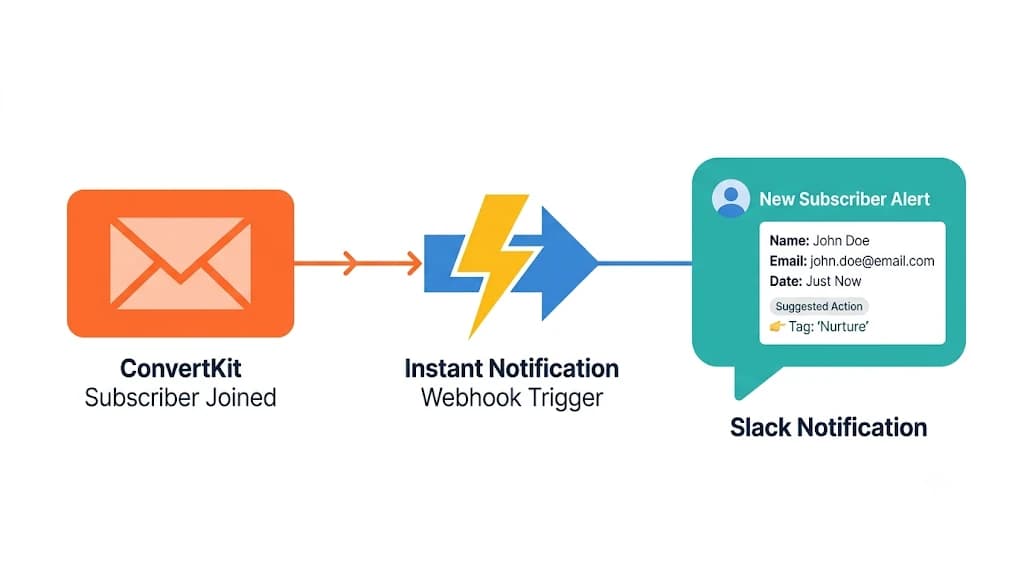
Die ConvertKit + Slack-Integration ist ein Trigger-Action-Workflow, bei dem Ereignisse von ConvertKit-Abonnenten — neue Abonnenten, Tag-Hinzufügungen, Abschluss von Sequenzen und Kaufsignale — automatisch formatierte Benachrichtigungen an den entsprechenden Slack-Kanal senden, angereichert mit Abonnentenkontext und vorgeschlagenen nächsten Schritten.
Trigger: Ein neuer Abonnent tritt einem ConvertKit-Formular, Tag oder Segment bei.
Aktion: Das Abonnentenevent wird erfasst, mit verfügbaren Kontexten (Quelle, Tag, Empfehlungs-URL) angereichert und nach Slack geleitet.
Ergebnis: Eine Slack-Benachrichtigung landet im richtigen Kanal mit Abonnentendetails, Segmentinformationen und vorgeschlagenen nächsten Schritten — in Echtzeit.
Schritt-für-Schritt-Einrichtung
Schritt 1: Wählen Sie Ihre Auslöseereignisse. Entscheiden Sie, welche ConvertKit-Ereignisse für Ihr Team am wichtigsten sind. Die wertvollsten Trigger sind neue Abonnenten aus hochgradig interessierten Lead-Magneten, Tag-Hinzufügungen, die Änderungen in der Kaufphase signalisieren, Abschluss von Sequenzen und Kaufereignisse.
Schritt 2: Route zu Slack. Jedes Ereignis sendet eine formatierte Benachrichtigung an den entsprechenden Slack-Kanal. Häufige Kanäle sind: #new-leads für Abonnenten, #content-engagement für E-Mail-Öffnungen, #sales-alerts für Kaufsignale. Halten Sie die Weiterleitung spezifisch, damit Benachrichtigungen dort landen, wo sie von der relevanten Person gesehen werden.
Schritt 3: Den Signal anreichern. Eine einfache Integration sendet rohe Abonnentendaten. Fügen Sie Kontext hinzu: Abonnentenquelle (welcher Blogbeitrag, welche Anzeige), Themeninteresse (worauf sie sich angemeldet haben), Engagement-Historie (wie viele E-Mails sie geöffnet haben) und eine vorgeschlagene Follow-up-Aktion.
Schritt 4: Handeln. Ihr Team kann sofort reagieren — eine personalisierte LinkedIn-Nachricht senden, einen Anruf auslösen oder den Lead für eine Demo kennzeichnen. Die Benachrichtigung leistet die Arbeit, das Signal zu entfalten. Die Reaktion bleibt dennoch menschlich.
Beispiel für die Benachrichtigungslast
Für Teams, die die Datenstruktur verstehen möchten, hier ein Beispiel dafür, was von ConvertKit nach Slack fließt:
# ConvertKit-Ereignis → Slack-Benachrichtigung
trigger:
  platform: convertkit
  event: subscriber_added
  form: "AI SEO Audit Lead Magnet"
  subscriber:
    email: "[email protected]"
    first_name: "Jane"
    tags: ["seo-interested", "saas-founder"]
    source: "blog/ai-seo-audit-checklist-2026"

action:
  platform: slack
  channel: "#new-leads"
  message: |
    Neuer Abonnent: Jane von GrowthCo
    Formular: AI SEO Audit Lead Magnet
    Quelle: AI SEO Audit Checklist Blogbeitrag
    Tags: seo-interested, saas-founder
    Vorgeschlagene Aktion: LinkedIn-Verbindungsanfrage + Audit-Angebot
Häufige Anwendungsfälle für SaaS-Teams
Echtzeit-Lead-Benachrichtigungen
Ein Interessent lädt Ihre kostenlose SEO-Audit-Checkliste herunter und abonniert ConvertKit. Slack benachrichtigt sofort Ihren Gründer-Kanal mit den Abonnentendetails, der Quellseite und einer vorgeschlagenen Kontaktaufnahme. Das Zeitfenster zwischen der Anmeldung und dem Follow-up schrumpft von Tagen auf Minuten.
Überwachung von Segmentänderungen
Wenn ein Abonnent anhand von E-Mail-Öffnungen oder Link-Klicks von Bewusstsein zu Bewertung wechselt, warnt Slack den Verkaufs-Kanal, sodass ein Mensch mit einer relevanten Nachricht folgen kann. Segmentänderungen sind das am meisten untergenutzte Kaufsignal in den meisten ConvertKit-Konten.
Verfolgung des Engagements mit Inhalten
Nach dem Senden einer ConvertKit-Broadcast erhält Slack eine Zusammenfassung der Öffnungsraten, Klickraten und der am stärksten engagierten Abonnenten — damit Ihr Content-Team weiß, was ankam und wen es unmittelbar nach dem Versand zu kontaktieren gilt.
Kauf- und Konversionssignale
Wenn ein Abonnent einen Kauf abschließt oder eine Testphase beginnt, die über ConvertKit-Tags verfolgt wird, warnt Slack den entsprechenden Kanal für das Onboarding-Follow-up. Je schneller Ihre Reaktion auf ein Kaufereignis ist, desto höher ist Ihre Aktivierungsrate.
Wie Thoth den ConvertKit + Slack-Workflow verbessert
Einfache ConvertKit + Slack-Integrationen über Zapier oder native Webhooks senden rohe Benachrichtigungen. Thoth fügt darauf eine Intelligenz hinzu:
Intentsanreicherung. Jedes Abonnentenevent wird mit der abgeleiteten Kaufphase, Themeninteresse und Lead-Score basierend auf der Quellseite und der Engagement-Historie markiert. Ein Abonnent aus Ihrem Blog zur "Wettbewerbslückenanalyse" erhält ein anderes Intent-Tag als ein Abonnent von Ihrer Homepage.
Handlungsvorschläge. Slack-Benachrichtigungen enthalten vorgeschlagene nächste Schritte: LinkedIn-Verbindungsanfrage, personalisierte E-Mail, Demo-Angebot oder Inhaltsrecommendation. Der Vorschlag basiert auf der Quelle und der Tag-Kombination — nicht auf einer generischen Vorlage.
Kampagnengedächtnis. Abonnentensignale fließen in Thoths Marketing-Loop zurück. Hoch engagierte Abonnenten werden zu Zielen für LinkedIn-Outreach und Reddit-Monitoring-Signale. Niedrig engagierte Segmente lösen Inhaltsaktualisierungen aus.
Cross-Channel-Routing. Ein ConvertKit-Abonnent, der auch auf LinkedIn aktiv ist, erhält koordiniertes Follow-up — keine doppelte Kontaktaufnahme aus nicht verbundenen Kanälen. Die Mailchimp + LinkedIn-Integration behandelt dieses Muster im Detail für Teams, die beide Plattformen nutzen.
ConvertKit + Slack vs. Zapier: Was ist der Unterschied?
Zapier kann ConvertKit und Slack mit einem einfachen Trigger-Action-Zap verbinden. Die Benachrichtigung kommt an. Das ist der Punkt, an dem Zapier stoppt.
Die Lücke liegt in der Anreicherung und Intelligenz. Zapier sendet Ihnen die E-Mail-Adresse eines Abonnenten. Eine angereicherte Integration sendet Ihnen die Firma des Abonnenten, die Rolle, den Quellen-Blogbeitrag, die Engagement-Historie, die abgeleitete Kaufphase und eine vorgeschlagene Follow-up-Aktion — alles in der gleichen Slack-Nachricht.
Für einen einzelnen Gründer oder ein Team von zwei Personen ist der Unterschied zwischen einer rohen Benachrichtigung und einer angereicherten der Unterschied zwischen dem Wissen, dass ein Lead angekommen ist, und dem Wissen, was damit zu tun ist.
FAQ
Bereit, Ihre E-Mail-Abonnenten mit Ihrem Team-Workflow zu verbinden? [Holen Sie sich ein kostenloses AI SEO Audit](https://distribution.studio) und sehen Sie, wie Thoth ConvertKit, Slack und Ihr gesamtes Marketing-Stack verbindet.
Back to all blogs