LinkedIn + Airtable integration: how to sync leads automatically
Every founder running LinkedIn outreach has the same bottleneck: the leads live in LinkedIn, but the pipeline lives in Airtable. Connecting them means copy-pasting prospect names, companies, and conversation status into rows — manually, repeatedly, and inconsistently.
A LinkedIn + Airtable integration eliminates that bottleneck by syncing prospect data, engagement signals, and outreach status automatically — so your lead pipeline updates itself as your LinkedIn prospecting progresses.
Why integrate LinkedIn with Airtable?
Airtable is the de facto CRM for early-stage SaaS teams. It is flexible, visual, and fast to set up. But without an automated LinkedIn connection, the data entry problem kills your outreach velocity:
- A prospect accepts your LinkedIn connection request. You forget to add them to
Airtable until next week.
- You send 30 LinkedIn messages. Tracking which ones replied requires switching
between LinkedIn and Airtable constantly.
- Your co-founder wants to see the pipeline. The Airtable is three days out of date.
The result: your outreach effort is real, but your pipeline data does not reflect it. When every record requires a manual update, records stop being updated.
What is the LinkedIn + Airtable integration workflow?
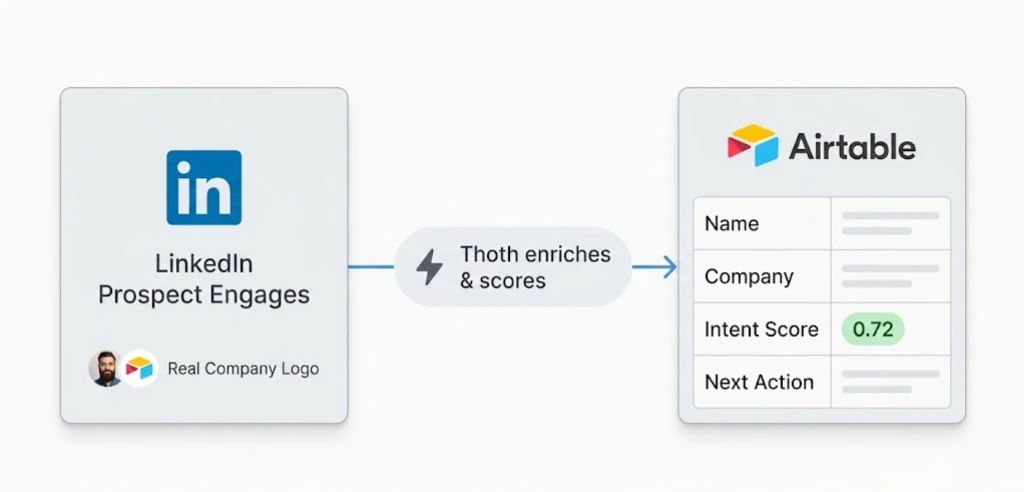
The LinkedIn + Airtable integration is a trigger-action workflow where LinkedIn prospect engagement events — connection accepts, message replies, post interactions, and profile views — automatically create or update Airtable records enriched with company data, intent signals, and suggested next actions.
Trigger: Prospect engages on LinkedIn — connection accepted, message replied, post liked, or profile viewed.
Action: The engagement event is captured, enriched with company data, role context, and intent signals.
Outcome: An Airtable record is created or updated with the prospect's details, engagement history, outreach status, and suggested next action — in real time.
Step-by-step setup
Step 1: Define your prospect pipeline fields. Set up an Airtable base with fields for: name, company, role, LinkedIn URL, engagement type, outreach status, intent score, next action, and last contact date. Start minimal — you can add fields as your workflow matures.
Step 2: Connect LinkedIn monitoring. Thoth monitors your LinkedIn activity for prospect engagement — connection accepts, message replies, post interactions, and profile views. Each engagement is tagged with the prospect's context before it reaches Airtable.
Step 3: Auto-create or update Airtable records. When a new prospect engages, Thoth creates an Airtable record with enriched data: company size, industry, recent LinkedIn activity, and inferred buying stage. When an existing prospect re-engages, their record updates automatically.
Step 4: Track outreach progress. As the prospect moves through your outreach sequence — first message, follow-up, reply, meeting booked — the Airtable record updates automatically. Your pipeline stays current without manual input.
Step 5: Feed high-intent signals back into outreach. Prospects flagged as high-intent in Airtable get prioritised for follow-up messages, personalised content shares, and cold email sequences. Intent score drives prioritisation, not recency.
Example data flow
For teams that want to understand how data passes between platforms, here is the structure that flows from LinkedIn to Airtable:
# LinkedIn Engagement → Airtable Record
trigger:
  platform: linkedin
  event: connection_accepted
  prospect:
    name: "Alex Chen"
    company: "ScaleUp AI"
    role: "VP of Growth"
    linkedin_url: "linkedin.com/in/alexchen"
    mutual_connections: 12
    recent_posts: ["ai-marketing-trends", "seo-automation"]

action:
  platform: airtable
  base: "LinkedIn Pipeline"
  table: "Prospects"
  operation: create_record
  fields:
    name: "Alex Chen"
    company: "ScaleUp AI"
    role: "VP of Growth"
    linkedin_url: "linkedin.com/in/alexchen"
    engagement_type: "connection_accepted"
    intent_score: 0.72
    outreach_status: "Connected - Awaiting First Message"
    next_action: "Send personalized intro referencing AI marketing post"
    source: "linkedin-prospecting"
Common use cases for SaaS teams
Prospect pipeline management
Every LinkedIn connection, reply, and engagement automatically creates or updates an Airtable record. Your pipeline is always current — no manual data entry, no stale rows. Airtable views let you filter by intent score, outreach stage, or engagement recency without touching LinkedIn.
Outreach sequence tracking
Track which LinkedIn messages have been sent, which prospects replied, and which conversations need follow-up. Airtable views let you filter by outreach stage, intent score, or engagement recency. The data is always fresh because every engagement updates the record immediately.
Team collaboration
Multiple founders or SDRs can see the same Airtable pipeline. When one person sends a LinkedIn message, the record updates for everyone — eliminating duplicate outreach and missed follow-ups. No more asking "did we already contact this person?"
Cross-channel lead tracking
The same pattern works for other channels. Prospects who appear on both LinkedIn and your email list get coordinated outreach tracked in one Airtable base. For teams also running Mailchimp campaigns, see Mailchimp + LinkedIn integration for how to unify both signals.
Subscriber and subscriber-to-lead tracking
Email subscribers who also appear in your LinkedIn pipeline get combined intent signals — email opens plus LinkedIn engagement — weighted into a single intent score in Airtable. This is the highest-signal lead profile available to a lean SaaS team.
How Thoth enhances the LinkedIn + Airtable workflow
Basic LinkedIn-to-Airtable integrations — via Zapier or manual webhooks — move data. Thoth adds context:
Prospect enrichment. Thoth adds company size, industry, recent LinkedIn activity, mutual connections, and inferred buying stage to every Airtable record. A connection accept from a Head of Marketing at a 50-person SaaS company gets a different intent profile than the same event from a student account.
Intent scoring. Each prospect gets a relevance and intent score based on their engagement pattern, topic interest, and ICP match. High-intent prospects float to the top of your Airtable view automatically.
Action suggestions. Airtable records include suggested next actions: personalised message template, relevant content to share, or a timing recommendation for follow-up. The suggestion is based on the engagement type and prospect context — not a generic template.
Cross-channel coordination. A prospect who appears on both LinkedIn and your ConvertKit list gets coordinated outreach — not disconnected touchpoints from separate channels. For teams routing email signals to Slack as well, see ConvertKit + Slack integration for real-time subscriber alerts.
LinkedIn + Airtable vs Zapier: what is the difference?
Zapier can connect LinkedIn and Airtable with a basic trigger-action zap. The record gets created. That is where Zapier stops.
The gap is enrichment and intelligence. Zapier creates an Airtable row with a name and a LinkedIn URL. An enriched integration creates a row with the prospect's company, role, intent score, recent LinkedIn activity, inferred buying stage, and a suggested next action — all in one record.
For a solo founder managing 50+ active prospects, the difference between a raw row and an enriched one is the difference between having a database and having a pipeline that tells you what to do next.
FAQ
Ready to automate your LinkedIn lead pipeline? [Get a free AI SEO audit](https://distribution.studio) and see how Thoth connects LinkedIn, Airtable, and your entire outreach workflow.
Back to all blogs