LinkedIn + Airtable-Integration: So synchronisieren Sie Leads automatisch
Jeder Gründer, der eine LinkedIn-Akquise betreibt, hat dasselbe Engpassproblem: Die Leads leben in LinkedIn, aber das Pipeline-Leben findet in Airtable statt. Sie miteinander zu verbinden bedeutet, die Namen, Unternehmen und den Gesprächsstatus der Interessenten manuell, wiederholt und inkonsistent in Zeilen zu kopieren und einzufügen.
Eine LinkedIn + Airtable-Integration beseitigt dieses Engpassproblem, indem sie Interessentendaten, Engagement-Signale und Outreach-Status automatisch synchronisiert – sodass Ihre Lead-Pipeline sich selbst aktualisiert, während Ihre LinkedIn-Akquise fortschreitet.
Warum LinkedIn mit Airtable integrieren?
Airtable ist das de facto CRM für frühe SaaS-Teams (Software as a Service). Es ist flexibel, visuell und schnell einzurichten. Aber ohne eine automatisierte LinkedIn-Verbindung tötet das Datenanzeigeproblem Ihre Akquisegeschwindigkeit:
- Ein Interessent akzeptiert Ihre LinkedIn-Verbindungsanfrage. Sie vergessen, ihn bis zur nächsten Woche zu Airtable hinzuzufügen.
- Sie senden 30 LinkedIn-Nachrichten. Zu verfolgen, wer geantwortet hat, erfordert ständiges Wechseln zwischen LinkedIn und Airtable.
- Ihr Mitgründer möchte die Pipeline sehen. Airtable ist drei Tage veraltet.
Das Ergebnis: Ihre Akquiseanstrengungen sind echt, aber Ihre Pipeline-Daten spiegeln dies nicht wider. Wenn jeder Datensatz ein manuelles Update erfordert, hören die Aktualisierungen auf.
Was ist der Workflow der LinkedIn + Airtable-Integration?
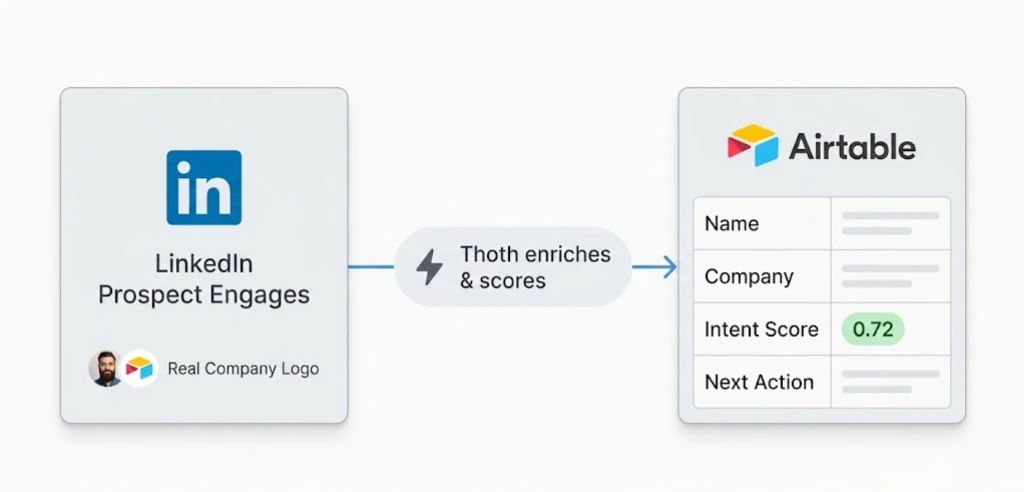
Die LinkedIn + Airtable-Integration ist ein Trigger-Action-Workflow, bei dem LinkedIn-Engagement-Events – Verbindungsakzeptanz, Nachrichtenantworten, Interaktionen mit Beiträgen und Profilansichten – automatisch Airtable-Datensätze erstellen oder aktualisieren, die mit Unternehmensdaten, Absichtssignalen und vorgeschlagenen nächsten Aktionen angereichert sind.
Trigger: Interessent engagiert sich auf LinkedIn – Verbindung akzeptiert, Nachricht beantwortet, Beitrag gelikt oder Profil angesehen.
Aktion: Das Engagement-Event wird erfasst und mit Unternehmensdaten, Kontext zur Rolle und Absichtssignalen angereichert.
Ergebnis: Ein Airtable-Datensatz wird mit den Einzelheiten des Interessenten, der Engagement-Historie, dem Outreach-Status und der vorgeschlagenen nächsten Aktion – in Echtzeit – erstellt oder aktualisiert.
Schritt-für-Schritt-Einrichtung
Schritt 1: Definieren Sie Ihre Prospect-Pipeline-Felder. Richten Sie eine Airtable-Datenbank mit Feldern für: Name, Unternehmen, Rolle, LinkedIn-URL, Engagement-Typ, Outreach-Status, Intent-Score (Absichtspunkt), nächste Aktion und Datum des letzten Kontakts ein. Beginnen Sie minimal – Sie können Felder hinzufügen, während Ihr Workflow sich entwickelt.
Schritt 2: Verbinden Sie die LinkedIn-Überwachung. Thoth überwacht Ihre LinkedIn-Aktivität auf Interessenteneingagement – Verbindungsakzeptanzen, Nachrichtenantworten, Interaktionen mit Beiträgen und Profilansichten. Jedes Engagement wird vor dem Erreichen von Airtable mit dem Kontext des Interessenten gekennzeichnet.
Schritt 3: Automatisch Airtable-Datensätze erstellen oder aktualisieren. Wenn ein neuer Interessent sich engagiert, erstellt Thoth einen Airtable-Datensatz mit angereicherten Daten: Unternehmensgröße, Branche, kürzliche LinkedIn-Aktivität und abgeleitete Kaufphase. Wenn sich ein bestehender Interessent erneut engagiert, wird dessen Datensatz automatisch aktualisiert.
Schritt 4: Verfolgen Sie den Fortschritt der Akquise. Während der Interessent durch Ihre Akquise-Sequenz – erste Nachricht, Nachverfolgung, Antwort, gebuchtes Meeting – fortschreitet, wird der Airtable-Datensatz automatisch aktualisiert. Ihre Pipeline bleibt aktuell, ohne manuelle Eingaben.
Schritt 5: Geben Sie hochgradige Absichtssignale zurück in die Akquise. Als hochgradig eingestufte Interessenten in Airtable priorisieren Sie Folge-Nachrichten, personalisierte Inhaltsfreigaben und Kaltakquise-E-Mails. Der Intent-Score treibt die Priorisierung an, nicht die Aktualität.
Beispiel-Datenfluss
Für Teams, die verstehen möchten, wie Daten zwischen Plattformen fließen, hier die Struktur, die von LinkedIn zu Airtable fließt:
# LinkedIn Engagement → Airtable Record
trigger:
  platform: linkedin
  event: connection_accepted
  prospect:
    name: "Alex Chen"
    company: "ScaleUp AI"
    role: "VP of Growth"
    linkedin_url: "linkedin.com/in/alexchen"
    mutual_connections: 12
    recent_posts: ["ai-marketing-trends", "seo-automation"]

action:
  platform: airtable
  base: "LinkedIn Pipeline"
  table: "Prospects"
  operation: create_record
  fields:
    name: "Alex Chen"
    company: "ScaleUp AI"
    role: "VP of Growth"
    linkedin_url: "linkedin.com/in/alexchen"
    engagement_type: "connection_accepted"
    intent_score: 0.72
    outreach_status: "Connected - Awaiting First Message"
    next_action: "Send personalized intro referencing AI marketing post"
    source: "linkedin-prospecting"
Häufige Anwendungsfälle für SaaS-Teams
Verwaltung der Interessenten-Pipeline
Jede LinkedIn-Verbindung, Antwort und Engagement erstellt automatisch einen Airtable-Datensatz oder aktualisiert ihn. Ihre Pipeline ist immer aktuell – keine manuelle Dateneingabe, keine veralteten Zeilen. Airtable-Ansichten ermöglichen es Ihnen, nach Absichtspunkt, Akquisestadium oder Engagement-Aktualität zu filtern, ohne LinkedIn zu berühren.
Verfolgung der Akquise-Sequenz
Verfolgen Sie, welche LinkedIn-Nachrichten gesendet wurden, welche Interessenten geantwortet haben und welche Gespräche Nachverfolgung benötigen. Airtable-Ansichten ermöglichen es Ihnen, nach Akquisestadium, Absichtspunkt oder Engagement-Aktualität zu filtern. Die Daten sind immer aktuell, da jedes Engagement den Datensatz sofort aktualisiert.
Teamkollaboration
Mehrere Gründer oder SDRs können dieselbe Airtable-Pipeline sehen. Wenn jemand eine LinkedIn-Nachricht sendet, wird der Datensatz für alle aktualisiert – doppelte Akquise und verpasste Nachverfolgungen werden ausgeschlossen. Keine Fragen mehr wie „Haben wir diese Person bereits kontaktiert?“
Übergreifende Lead-Verfolgung
Dasselbe Muster funktioniert für andere Kanäle. Interessenten, die sowohl auf LinkedIn als auch auf Ihrer E-Mail-Liste erscheinen, erhalten koordinierte Akquise, die in einer Airtable-Basis verfolgt wird. Für Teams, die auch Mailchimp-Kampagnen durchführen, siehe Mailchimp + LinkedIn-Integration für Informationen zur Vereinheitlichung beider Signale.
Abonnenten- und Abonnenten-zu-Lead-Verfolgung
E-Mail-Abonnenten, die auch in Ihrer LinkedIn-Pipeline erscheinen, erhalten kombinierte Absichtssignale – E-Mail-Öffnungen plus LinkedIn-Engagement – gewichtet in einem einzigen Intent-Score in Airtable. Dies ist das signifikanteste Lead-Profil, das einem schlanken SaaS-Team zur Verfügung steht.
Wie Thoth den LinkedIn + Airtable-Workflow verbessert
Einfachere LinkedIn-zu-Airtable-Integrationen – über Zapier oder manuelle Webhooks – bewegen Daten. Thoth fügt Kontext hinzu:
Anreicherung von Interessenten. Thoth fügt jeder Airtable-Aufzeichnung Unternehmensgröße, Branche, kürzliche LinkedIn-Aktivität, gemeinsame Verbindungen und abgeleitete Kaufphase hinzu. Eine Verbindungsakzeptanz von einem Marketing-Leiter in einem 50-Personen-SaaS-Unternehmen erhält ein anderes Intent-Profil als dasselbe Ereignis von einem Studentenaccount.
Absichtspunktbewertung. Jeder Interessent erhält eine Relevanz- und Absichtspunktbewertung basierend auf ihrem Engagement-Muster, ihrem Themeninteresse und ihrem ICP-Matching (Ideal Customer Profile). Hochgradig engagierte Interessenten steigen automatisch in Ihre Airtable-Ansicht auf.
Vorschläge für Aktionen. Airtable-Datensätze enthalten vorgeschlagene nächste Aktionen: personalisierte Nachrichtenschablonen, relevante Inhalte zum Teilen oder eine zeitliche Empfehlung für die Nachverfolgung. Der Vorschlag basiert auf dem Engagement-Typ und dem Kontext des Interessenten – nicht auf einer generischen Vorlage.
Übergreifende Kanalkoordination. Ein Interessent, der sowohl auf LinkedIn als auch auf Ihrer ConvertKit-Liste erscheint, erhält koordinierte Akquise – nicht getrennte Kontaktpunkte aus verschiedenen Kanälen. Für Teams, die E-Mail-Signale auch an Slack übermitteln, siehe ConvertKit + Slack-Integration für Echtzeit-Abonnentenwarnungen.
LinkedIn + Airtable vs. Zapier: Was ist der Unterschied?
Zapier kann LinkedIn und Airtable mit einem einfachen Trigger-Action-Zap verbinden. Der Datensatz wird erstellt. Dort hört Zapier auf.
Die Lücke ist Anreicherung und Intelligenz. Zapier erstellt eine Airtable-Zeile mit einem Namen und einer LinkedIn-URL. Eine angereicherte Integration erstellt eine Zeile mit dem Unternehmen, der Rolle, dem Intent-Score, der kürzlichen LinkedIn-Aktivität, der abgeleiteten Kaufphase und einer vorgeschlagenen nächsten Aktion – alles in einem Datensatz.
Für einen alleinstehenden Gründer, der 50+ aktive Interessenten verwaltet, ist der Unterschied zwischen einer rohen Zeile und einer angereicherten der Unterschied zwischen einer Datenbank und einer Pipeline, die Ihnen sagt, was als Nächstes zu tun ist.
FAQ
Bereit, Ihre LinkedIn-Lead-Pipeline zu automatisieren? [Holen Sie sich ein kostenloses KI-SEO-Audit](https://distribution.studio) und sehen Sie, wie Thoth LinkedIn, Airtable und Ihren gesamten Outreach-Workflow verbindet.
Back to all blogs