Gumroad + ConvertKit-Integration: So synchronisieren Sie Kunden automatisch mit E-Mail
Jedes Mal, wenn jemand bei Gumroad kauft, geben sie Ihnen etwas Wertvolleres als den Verkauf: die Erlaubnis, erneut mit ihnen zu sprechen.
Die meisten Kreatoren verschwenden dies.
Der Käufer erhält den Download-Link und eine allgemeine Gumroad-Bestätigung. Keine Willkommenssequenz. Keine produktbezogene Einarbeitung. Kein Upsell-Pfad. Zwei Wochen später haben sie Ihren Namen vergessen, und die nächste Produkteinführung geht an eine E-Mail-Liste, die sie nicht einschließt – weil sie nie richtig hinzugefügt wurden.
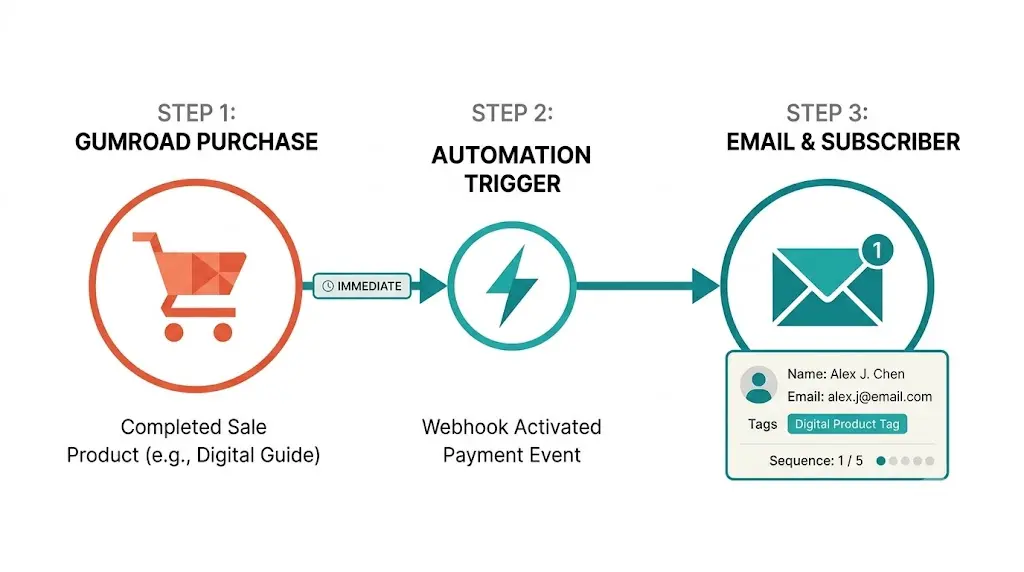
Eine Gumroad + ConvertKit-Integration behebt dies. Jeder Kauf löst automatisch eine gezielte ConvertKit-Sequenz aus. Der Käufer wird mit dem spezifischen Produkt, das er gekauft hat, gekennzeichnet, der richtigen Kategorie hinzugefügt und erhält eine Willkommenssequenz, die relevant für das ist, was er gerade gekauft hat – keine allgemeine Newsletter.
In diesem Beitrag erfahren Sie genau, wie Sie es einrichten, warum Zapier in großem Maßstab nicht funktioniert und wie eine richtig angereicherte Integration aussieht.
Warum jeder Gumroad-Verkauf einen ConvertKit-Trigger benötigt
Gumroad kümmert sich um die Transaktion. ConvertKit kümmert sich um die Beziehung.
Das sind unterschiedliche Aufgaben, und sie müssen absichtlich verbunden werden.
Gumroad ist hervorragend im Checkout, bei der Lieferung und im Affiliate-Management. ConvertKit ist hervorragend in segmentierten E-Mail-Sequenzen, Automatisierungsregeln und dem langfristigen Management von Abonnenten. Das Problem ist, dass die meisten Kreatoren die Bestell-E-Mail von Gumroad als Ende des Kauferlebnisses betrachten. Das ist es nicht. Es ist der Anfang der Kundenbeziehung – und diese Beziehung lebt in ConvertKit, nicht in Gumroad.
Was ein ordentlicher Workflow von Gumroad zu ConvertKit freischaltet:
Einarbeitung nach dem Kauf. Eine Sequenz aus fünf E-Mails, die Käufer durch die Nutzung des gekauften Produkts führt. Reduziert Rückerstattungsraten. Erhöht die Zufriedenheit. Schafft Mundpropaganda. Nichts davon passiert, wenn der Käufer nur im System von Gumroad bleibt.
Produktbezogene Segmentierung. Ein Käufer, der Ihre SEO-Vorlage gekauft hat, hat andere Interessen als ein Käufer, der Ihr LinkedIn-Playbook gekauft hat. ConvertKit-Tags ermöglichen es Ihnen, relevante Nachverfolgungsinhalte an jedes Segment zu senden. Ein allgemeiner Newsletter, der versucht, alle anzusprechen, ist die ineffektivste Version von E-Mail-Marketing für digitale Produktkreatoren.
Upsell-Sequenzen. Wenn ein Käufer Produkt A kauft, kann eine ConvertKit-Automatisierung drei Tage später eine Sequenz auslösen, die Produkt B zu einem Rabatt anbietet. Dies erfordert zu wissen, welches Gumroad-Produkt das ConvertKit-Abonnement ausgelöst hat. Ohne produktbezogene Kennzeichnungsdaten ist dies unmöglich zu personalisieren.
Wachstum des Lebenszeitwerts. Kunden, die relevante E-Mail-Sequenzen nach dem Kauf erhalten, kaufen mit signifikant höheren Raten wieder als Kunden, die nichts erhalten. ConvertKit ist der Ort, an dem diese Beziehung aufgebaut wird. Gumroad ist nur der Ort, an dem die erste Transaktion stattfindet.
Was ist die Gumroad + ConvertKit-Integration?
Die Gumroad + ConvertKit-Integration ist ein Trigger-Action-Workflow, bei dem ein abgeschlossener Gumroad-Kauf automatisch fünf Dinge bewirkt:
- Fügt den Käufer als Abonnenten in ConvertKit hinzu oder aktualisiert seinen bestehenden Datensatz.
- Kennzeichnet ihn mit dem spezifischen Gumroad-Produkt, das er gekauft hat.
- Fügt ihn dem richtigen ConvertKit-Segment hinzu.
- Löst die Automatisierungssequenz nach dem Kauf für dieses Produkt aus.
- Unterdrückt ihn von allgemeinen Newsletter-Sequenzen, bis die Einarbeitung abgeschlossen ist.
Das Schlüsselwort ist automatisch. Manuelle CSV-Exporte von Gumroad und manuelle Importe nach ConvertKit sind fehleranfällig und verzögern das Kauferlebnis um Stunden oder Tage. Ein Käufer, der sechs Stunden nach dem Kauf eine Willkommens-E-Mail erhält, hat bereits seinen emotionalen Höchstpunkt mit dem Produkt überschritten. Die Integration muss in Echtzeit erfolgen: Kauf abgeschlossen, ConvertKit-Abonnent erstellt, Sequenz ausgelöst.
Schritt-für-Schritt: Einrichtung der Gumroad + ConvertKit-Integration
Option 1: Der Zapier-Workflow
Der Standardansatz verwendet Zapier, um den Kauf-WebHook von Gumroad mit der Abonnenten-API von ConvertKit zu verbinden.
Schritt 1. Erstellen Sie ein Zapier-Konto und verbinden Sie Gumroad als Trigger-Quelle.
Schritt 2. Stellen Sie den Gumroad-Trigger auf "Neuer Verkauf" ein – dieser wird ausgelöst, wann immer ein Kauf abgeschlossen wird.
Schritt 3. Fügen Sie eine ConvertKit-Aktion hinzu – "Abonnent hinzufügen" mit der E-Mail-Adresse, dem Vornamen des Käufers und einem statischen Tag, der dem Gumroad-Produkt entspricht.
Schritt 4. Testen Sie mit einem Gumroad-Testkauf und bestätigen Sie, dass der Abonnent in ConvertKit mit dem richtigen Tag erscheint.
Schritt 5. Richten Sie ConvertKit-Automatisierungen ein, die ausgelöst werden, wenn ein Abonnent mit jedem Produkttag gekennzeichnet wird.
Dies funktioniert für eine einfache Einrichtung mit ein oder zwei Gumroad-Produkten. Die Einschränkungen treten auf, wenn Sie skalieren.
Nur statische Tags: Zapier sendet pro Zap nur ein festes Tag, keine dynamischen produktbezogenen Tags. Mehrere Produkte erfordern mehrere Zaps.
Keine Anreicherung: Der vollständige Gumroad-Kontext des Käufers – Produktvariante, Bündel, Referral-Quelle, verwendeter Gutschein – wird nicht an ConvertKit übergeben.
Keine Duplizierungskriterien: Wenn ein Käufer zweimal kauft, kann Zapier doppelte Abonnenten erstellen oder bestehende Tags überschreiben.
Zapier-Kosten: Bei 1.000+ Gumroad-Verkäufen pro Monat erreichen Sie die Aufgabenlimits und zahlen für Überziehungen.
Option 2: Thoths angereicherter Integrations-Workflow
Thoths Gumroad + ConvertKit-Integration geht über den grundlegenden Zapier-WebHook hinaus.
Kauftrigger. Jeder Gumroad-Kauf löst einen WebHook aus, den Thoth in Echtzeit empfängt.
Anreicherung. Thoth extrahiert den gesamten Kaufkontext – Produktname, Variante, Bündelmitgliedschaft, verwendeter Gutschein, Referral-Quelle und ob der Käufer ein neuer oder wiederkehrender Gumroad-Kunde ist.
Dynamische Kennzeichnung. ConvertKit-Tags werden dynamisch basierend auf dem Kaufkontext festgelegt, nicht statisch pro Zap. Ein Käufer, der ein Bündel gekauft hat, wird als Bündelkäufer gekennzeichnet. Ein Käufer, der einen speziellen Affiliate-Gutschein verwendet hat, wird mit dieser Affiliate-Quelle gekennzeichnet. Wiederkehrende Käufer erhalten ein Tag "Rückkehrender Kunde", das die Willkommenssequenz für Erstkäufer unterdrückt.
Sequenzroute. Die richtige ConvertKit-Sequenz für jedes Produkt wird automatisch ausgelöst – keine manuelle Automatisierungsregel für jedes neue Produkt.
Duplizierung. Thoth überprüft bestehende ConvertKit-Abonnenten, bevor neue erstellt werden, und aktualisiert den Abonnentendatensatz mit neuen Tags, anstatt Duplikate zu erstellen.
Kampagnen-Gedächtnis. Kaufmuster, Öffnungsraten von Sequenzen und Konversionsdaten werden in Thoths Inhaltsplanung zurückgespeist – sodass der Inhalt, den Sie als Nächstes veröffentlichen, widerspiegelt, woran Ihre Gumroad-Käufer tatsächlich interessiert sind. Dies ist der gleiche Loop, der KI-Zitations-Tracking Ihre Inhaltseffekte im Laufe der Zeit vervielfacht.
Die Tabelle zum Gumroad + ConvertKit-Workflow
Hier ist die empfohlene Einrichtung für einen Kreator mit fünf oder mehr Gumroad-Produkten:
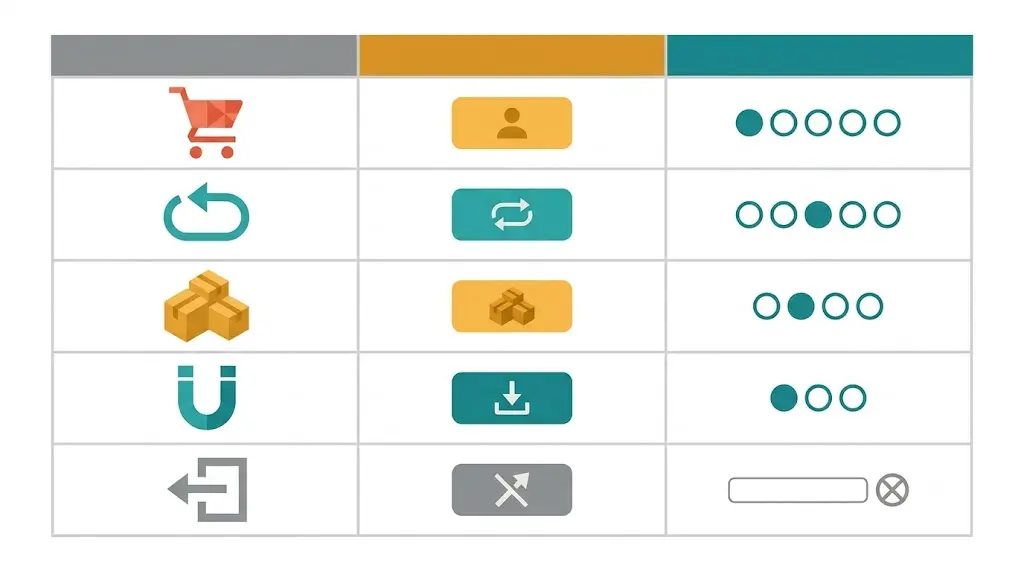
| Kaufereignis | ConvertKit-Aktion | Ausgelöste Sequenz |
|---|---|---|
| Erstkäufer, Produkt A | Abonnenten hinzufügen, Tag "product-a-buyer" + "new-buyer" | Produkt A Willkommens- + Einarbeitungs-E-Mail (5 E-Mails) |
| Wiederkehrender Käufer, Produkt B | Abonnent aktualisieren, Tag "product-b-buyer" + "returning-buyer" hinzufügen | Produkt B Schnellstart (3 E-Mails – Grundlagen überspringen) |
| Bündel-Kauf | Abonnenten hinzufügen, Tag "bundle-buyer" + alle enthaltenen Produkte | Bündel-Willkommens- + Überorientierung |
| Kostenloser Lead-Magnet-Download | Abonnenten hinzufügen, Tag "lead-magnet-[name]" | Nurture-Sequenz – Produkt-Pitch in E-Mail 7 |
| Rückerstattung bearbeitet | Abonnent aktualisieren, Tag "refunded" hinzufügen, von Werbeaktionen unterdrücken | Winback-Sequenz nach 30 Tagen |
Häufige Fehler bei Gumroad + ConvertKit-Integrationen
Nicht nach Produkt zu kennzeichnen. Alle Gumroad-Käufer ohne produktbezogene Tags zu einer einzigen ConvertKit-Liste hinzuzufügen, macht es unmöglich, relevante Nachverfolgungsinhalte in großem Maßstab zu senden. Jedes neue Gumroad-Produkt benötigt sein eigenes ConvertKit-Tag und Automatisierungsregel.
Nutzung der nativen Gumroad-E-Mail für die Einarbeitung. Die E-Mail von Gumroad nach dem Kauf ist eine Bestätigung, keine Beziehung. Der Sequenzeditor von ConvertKit ist erheblich flexibler – nutzen Sie ihn.
Keine Unterdrückung allgemeiner Sequenzen während der Einarbeitung. Wenn ein neuer Käufer am ersten Tag der Nachkaufsequenz in Ihren wöchentlichen Newsletter aufgenommen wird, erhält er in der ersten Woche zwei bis drei E-Mails und meldet sich schneller ab. Unterdrücken Sie neue Käufer von Rundsendungs-E-Mails, bis ihre Einarbeitungssequenz abgeschlossen ist.
Keine Logik für wiederkehrende Käufer. Ein Käufer, der ein zweites Gumroad-Produkt kauft, sollte nicht dieselbe Willkommenssequenz für Erstkäufer erhalten. Ein "returning-buyer"-Tag unterdrückt die allgemeine Einarbeitung und löst eine kürzere, schnellere Sequenz aus.
Keine Verbindung der Kaufdaten zur Inhaltsstrategie. Ihre beliebtesten Gumroad-Produkte zeigen, wofür Ihr Publikum bereit ist zu zahlen. Diese Daten sollten Ihren nächsten Blogbeitrag und den ConvertKit-Rundsendekalender speisen. Für Teams, die automatisierte Kontaktaufnahme neben E-Mail verwenden, gibt die ConvertKit + Slack-Integration diese Signalsignale in Echtzeit an Ihr Team weiter. Für die LinkedIn-Verbreitung des entstandenen Inhalts deckt die Mailchimp + LinkedIn-Integration für SaaS-Kontaktaufnahme diesen Workflow ab.
FAQ
Bereit, Gumroad und ConvertKit mit umfassenderen Daten zu verbinden, als Zapier liefert? [Erhalten Sie ein kostenloses AI-Sichtbarkeits-Audit bei distribution.studio](https://distribution.studio) und sehen Sie, wie Thoth Ihre Produkt-, E-Mail- und Inhalts-Workflows in einen selbstlernenden Wachstumsloop integriert.
Back to all blogs